
English:FAQ-💡Frequently asked questions: SDL internet
For Eduroam 📖instructions click here ➡️ https://www.sdl.si/en/internet
✔️ What is Eduroam?
Eduroam is an international secure academic network intended for students, employees and researchers.
It enables:
- uniform access to the network at all participating institutions (universities, libraries, research institutes, ŠDL),
- secure connection with encryption,
- use of the same AAI credentials (username + password) everywhere.
✔️ What do I need to use Eduroam?
Valid AAI account (from university or institution).
Official configuration from https://cat.eduroam.org (read instructions SDL.si/en/internet)
Mobile phone or computer with WPA2/WPA3 Enterprise support.
ℹ️ Important
- Always use the official configuration from 👉 https://cat.eduroam.org or https://www.geteduroam.app/
- Do not use old or manually configured profiles 🚫
- If the AAI login does not work, check access to VIS/ŠIS/Moodle – for password issues, contact your faculty.
🛠️ Eduroam Common Issues
| Problem | Possible Cause | Solution |
|---|---|---|
| Unable to join network / Cannot connect | Incorrect username or password | Verify your AAI credentials and use the full format (e.g., name@student.uni-lj.si). |
| Frequent disconnections | Old manual settings or conflicting Wi-Fi profiles | Remove old eduroam profiles and reinstall the official configuration using the Eduroam CAT tool. |
| Profile not downloading / iOS does not show “Profile Downloaded” | System blocking profile download | Restart the device, ensure a stable internet connection, update the OS, and allow all necessary permissions in the Eduroam CAT app. |
| Certificate warnings | Untrusted or incorrect certificate | Download the profile via cat.eduroam.org and accept the official certificate during installation. |
| No Wi-Fi network detected | Wi-Fi turned off or weak signal | Enable Wi-Fi and move closer to the access point. |
| App cannot install profile (Android) | Missing permissions | Grant all required permissions for the Eduroam CAT app. |
| Still not working | Incorrect configuration, old settings, interference | Delete all old eduroam profiles, restart the device, and reinstall the CAT configuration. |
| Connected but “No Internet” | DHCP error, duplicate profile, incorrect certificate | Remove eduroam, reinstall the CAT configuration, and restart Wi-Fi or the device. |
| Very slow connection or works only in certain areas | Overloaded access point, interference, walls | Move closer to the access point, disable personal hotspots, and notify the administrator if needed. |
| Works on phone but not on computer (or vice versa) | Expired certificate, outdated configuration, antivirus interference | Temporarily disable antivirus, remove old profiles, and install the latest CAT configuration. |
| Always asks for password | SecureW2 does not save credentials; manual configuration | Avoid entering passwords in system prompts; verify credentials in SecureW2 or reinstall the CAT configuration. |
| AAI login does not work in Eduroam | Issue with AAI account | Verify login in VIS/ŠIS/Moodle; contact the faculty for password assistance (managed by the faculty, not ŠDL). |
| Strange certificate warnings | Old or incorrect certificates | Download the complete configuration via cat.eduroam.org and accept the official certificate. |
| Connection occasionally drops | Interference from personal hotspots or Wi-Fi extenders | Disable personal hotspots and remove unauthorized access points. |
| Does not work after OS update | Update changed security settings | Reinstall the CAT configuration, accept the certificate again, and restart the device. |
| Device sees network but cannot connect | Incorrect date/time or blocked Enterprise login | Verify date and time, update the OS, install CAT, and toggle Wi-Fi off and on. |
| Unable to join network immediately / Connection fails randomly | Controller or RADIUS assigns incorrect profile / references the wrong database | Turn Wi-Fi off and on; the device will then correctly connect to the appropriate authentication SSID. |
📱 Eduroam – iPhone Issues (Solution)
If your iPhone cannot connect to the Eduroam network, follow the steps below 👇
🔧 Recommended Procedure
1️⃣ Delete the geteduroam app (if installed).
2️⃣ Go to Settings → General → VPN & Device Management
➜ Delete all existing Eduroam profiles.
3️⃣ Restart your iPhone 🔄
4️⃣ Turn on Wi-Fi and select the Eduroam network.
5️⃣ When prompted, enter:
👤 Your username in full AAI format
(e.g., firstname.lastname@student.uni-lj.si)
🔑 Your AAI account password
6️⃣ When the certificate warning appears, select Trust ✅
📶 The connection should be established within a few seconds.
⚠️ If the connection does not succeed immediately
- Turn Wi-Fi off and on again 🔁
- Check that your date and time are correct ⏰
- Make sure your iOS is up to date 📲
- Try connecting multiple times in a row (sometimes the RADIUS server needs to sync)
🎯 If the connection still doesn't work
Restart the device
Remove all old Wi-Fi profiles
New installation via cat.eduroam.org & sdl.si/en/internet
Check AAI password and username
Contact dormitory administrator or home faculty support
ℹ️ General questions:
👨🏼🎓 Moj Študent login problems ?
When you enter SDL dormitories for the first time you have 3 days to login into moj študent and register your email if you failed to do so please contact reception office (Sprejemna pisarna)
If your password is not working and you clicked Forgot your password? but you receive no email (not even in spam folder?)
Contact reception office (Sprejemna pisarna) 📧 sprejemna@sdl.si
🏠 How to locate your dormitory administrator ?
Log in to My Student: https://student.sd-lj.si/#
Click on ‘Desktop’ at the bottom of the page – you should see the administrator displayed there.
Administrators can also be reached via email: 📧 internetDom(number)@sdl.si
| Dorm | |
|---|---|
| Dom A–D | internetDomA@sdl.si, internetDomB@sdl.si, internetDomC@sdl.si, internetDomD@sdl.si |
| Dom 1–14 | internetDom1@sdl.si – internetDom14@sdl.si |
| DPL / FDV | internetDomDPL@sdl.si, internetDomFDV@sdl.si |
| G59 / VSZ | internetDomG59@sdl.si , internetDomVSZ@sdl.si |
| SD3 / SD4 | internetDomSD3@sdl.si, internetDomSD4@sdl.si |
| Poljanska / Ilirska | internetDomPoljanska@sdl.si, internetDomIlirska@sdl.si |
| AK / Litostroj / Topniška | internetDomAK@sdl.si, internetDomLitostroj@sdl.si, internetDomTopniska@sdl.si |
If the administrator is not listed or is not responding, please contact the dorm representative who will notify the administration.
🔒Why is access to a certain website blocked on the Student Dorm Ljubljana (ŠDL/ Eduroam) network?
Student Dorm Ljubljana does not impose any restrictions or block access to online content. !!
If access to a specific website or service is unavailable, the limitation is most likely enforced by the network service provider, Arnes.
ŠDL has no control over such external restrictions.
🧰 How to add a router or access point to SDLnet
This is currently not supported and not allowed
Doing this will violet SDL rules and have consequences !!
📡 Why do I only have an IPv6 address and not an IPv4 address on the Student Dorm Ljubljana (ŠDL/Eduroam) network?
Only IPv6 is enabled on Wi-Fi.
Both IPv4 and IPv6 are enabled on a wired connection.
The SDL has a limited number of IPv4 addresses. When they are full, users only get IPv6.
Currently, the SDL cannot obtain any more IPv4 addresses.
How do I check which IPv? i have? https://www.whatismyip.com/
📶 WiFi signal lost in my room or floor ?
Possible access point failure. Contact your home administrator to report the error to the appropriate service.
🚫 Why is the use of personal mobile hotspots or Wi-Fi access points not recommended in Student Dorm Ljubljana (ŠDL)?
They cause disruptions in the ŠDL network.
They reduce the quality and stability of the connection for everyone.
They cover channels and interfere with access points.
➡️ Use only official ŠDL networks.
🔧 SDLnet Common Issues
| Problem | Possible Cause | Solution |
|---|---|---|
| SDLnet does not connect, even though it worked before | Lost or changed SecureW2 settings | Settings → Network & Internet → Wi-Fi → Manage known networks → SDLnet → Edit → check the boxes in SecureW2 |
| Clicking on SDLnet prompts for username/password | SecureW2 does not contain your credentials | Do not enter the password in the system window; open the SecureW2 configuration and enter the correct credentials |
| Repeated password prompt windows | No saved credentials | Fix the configuration in SecureW2 or reinstall the client |
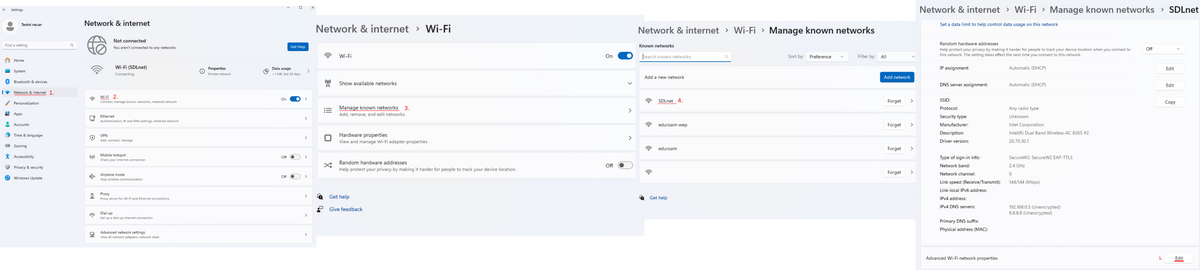


SDLnet Wifi unable to connect
Prerequisites: SDLnet was working fine than suddenly it won't connect anymore ?
Note: “This can randomly accure we are investigating the cause of this”
Check if the check mark is applied or missing.
Wi-Fi: Go to: Start → Settings → Network & Internet → Wi-Fi → Manage known networks → SDLnet → Advanced Wi-Fi network properties → Edit → Security → Select Secure W2 →Click Settings → verify check marks !
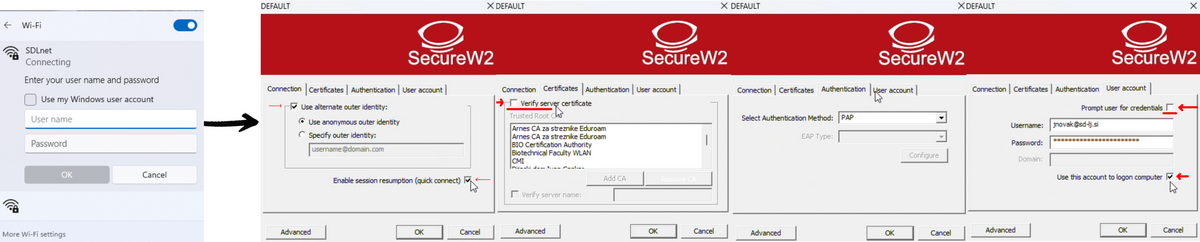
After installing Secure W2 client and clicking on SDLnet Wi-Fi request for username and password pops up ?
Your missing or have incorrect (username(email) /password) in Secure W2 Client. Do not enter anything in the pop up window !
To fix this go to Secure W2 client Configuration and add or verify your information (Location of the client in Problem 1 )
📚 If you have any suggestions, comments, or notice an error on the page, please inform your home administrator so they can inform us.